Follow the installer instructions
The installer will do the following in detail:
Tries to find your RE4 install folder
Removes every leftover of a previous REFramework install before
setting up the mod. Any other mods you have installed will be gone
as well — that's needed so RE4VR works correctly.
Back them up before you install RE4VR!
Asks you for OpenVR or OpenXR, Steam or Meta
Installs the newest mod version
All you have to do is click Next.
Start the game and play
Mod Options
OpenVR & OpenXR
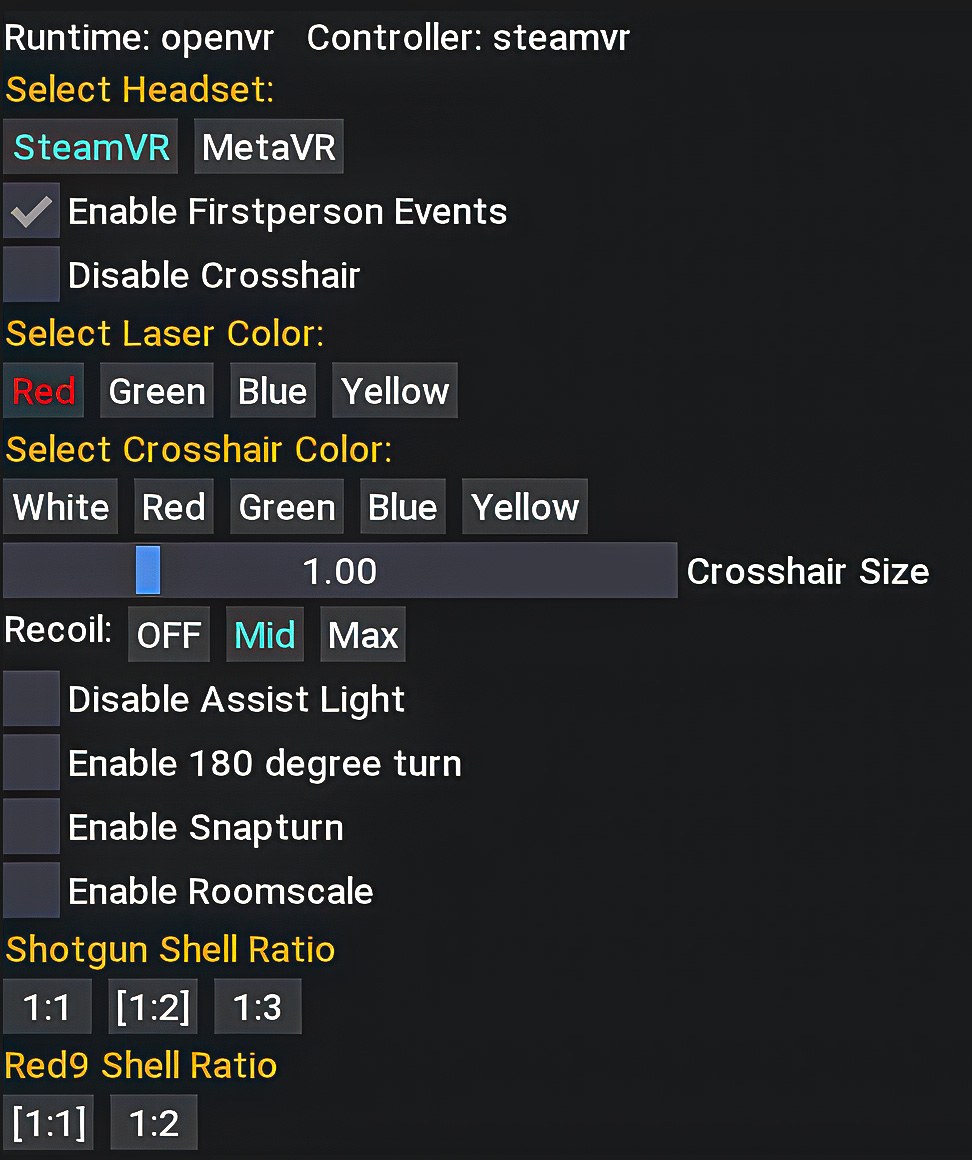
To open the mod menu, press LT + left controller B (Y) at any time.
Mod options in detail
Click to open full size
SteamVR / MetaVRSets the matching controller offsets for your headset. Pick the one you actually use, otherwise your hands and weapons will sit slightly off.
RecoilThree levels to choose from: off, mid and max.
Crosshair SizeA per weapon slider for the crosshair size.
Enable Dot CrosshairReplaces the regular crosshair with a simple dot for every weapon — it is even shown when aiming down the iron sights of rifles.
Dot Crosshair SizeSets the size of the dot when “Enable Dot Crosshair” is active.
Disable CrosshairNo crosshair at all.
Select Crosshair ColorColor of the regular crosshair. Default is white.
Select Laser ColorOnce you have the laser addon attached, the laser takes on the color you pick here. Default is red.
Disable Toxic GamesettingsDisables all ingame Settings that are toxic for VR automaticallyWhich settings
Controls
Aim Assist: OFF
Reticle Slowdown: 0
Auto Reload: OFF
Camera
Camera Assist: OFF
Camera Shake: OFF
Display
HDR Mode: OFF
Graphics
FidelityFX Super Resolution 1: OFF
FidelityFX Super Resolution 2: OFF
Screen Space Reflections: OFF
Hair Strands: OFF
Motion Blur: OFF
Lens Distortion: OFF
Depth of Field: OFF
Enable Firstperson EventsIf disabled, it switches all actions back to third person view, except for the main gameplay.
Enable 2D CutscenesPlays all cutscenes on a flat cinema screen in front of you instead of in 3D.
Disable Assist LightTurns off the light around the character.
Turn SpeedStays in sync with the in-game turn speed slider, but goes beyond its maximum for even faster turning.
Enable 180 degree turnDouble click the left stick down to perform a quick turn.
Enable SnapturnOnce enabled you can choose between three angles: 30, 45 or 90 degrees.
Enable RoomscaleThe character follows you around, crouching included.
Shotgun and Red9 Shell RatioDetermines how many shells go in per reload motion.
Rendering
The second category of the mod menu. It holds the
upscaler, the rendering technique and, on OpenXR, the render
resolution.
Enable UpscalingRenders the game at a lower resolution and upscales it again, which buys you a lot of frames. Leave it off if your GPU is fast enough.
SharpnessSharpens the upscaled image. The slider below it, Sharpness Amount, sets how strong that is.
Upscale TypeWhich upscaler is used: DLSS, FSR or XeSS.
Quality LevelFrom performance to quality. The last entry, DLAA, does not upscale at all, it only applies the anti aliasing.
DLSS PresetOnly visible with DLSS selected. Leave it alone unless you know what you are looking for.
Rendering TechniqueSingle Frame Multipass renders both eyes every frame and is the safe choice. AFW (beta) renders one eye per frame and warps the other one, which is faster but can show artifacts. The two entries below are greyed out on purpose, they caused too many problems in this game.
Resolution ScaleOpenXR only. Multiplies the resolution your runtime asks for, so 1.0 is exactly that. It starts at 0.5 so the game runs smoothly on first launch; raise it until it starts to stutter. The value only takes effect once you press Set next to it.
Bindings
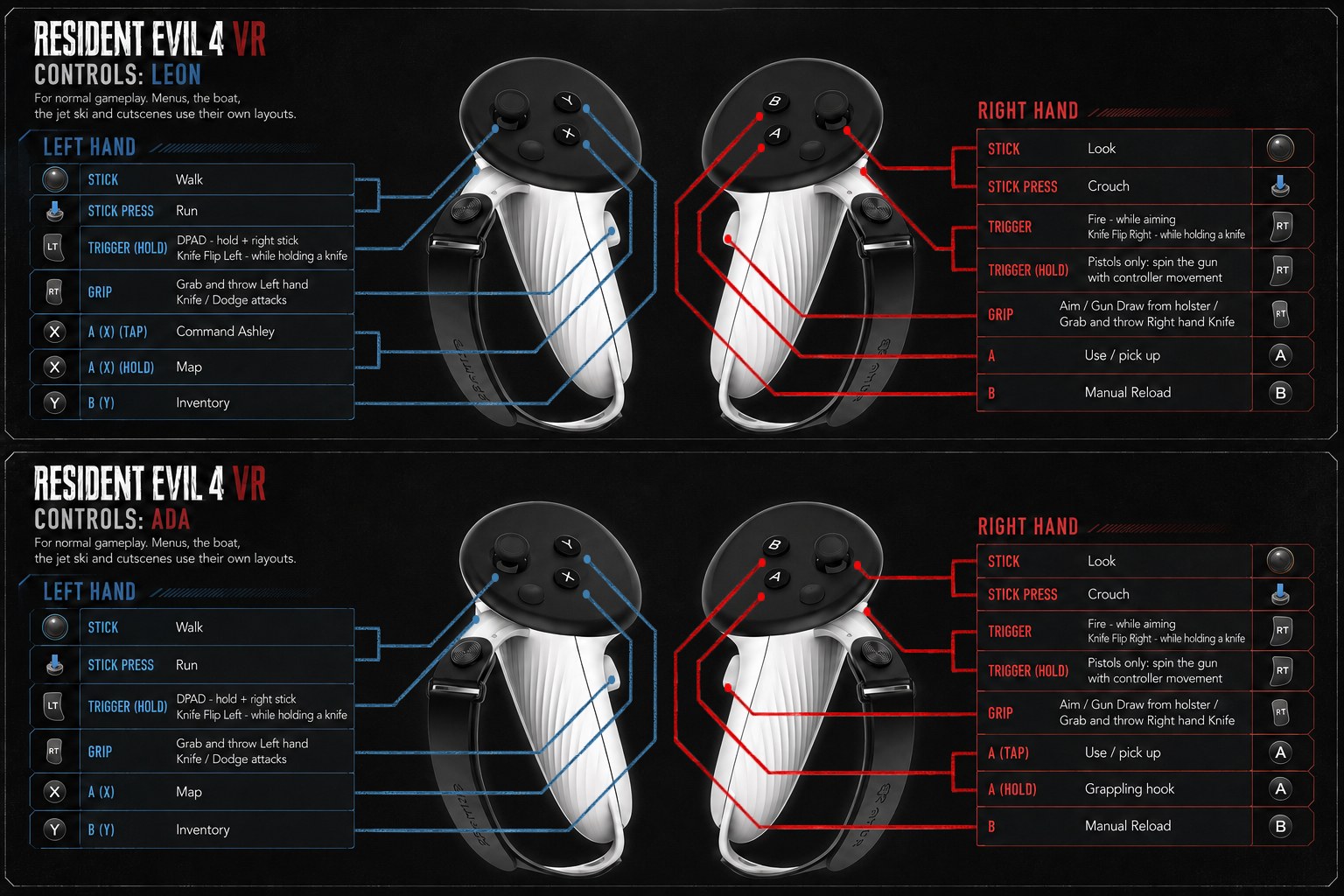
Here you can find the bindings for normal gameplay.
Keep in mind that menus, the boat, the jet ski and cutscenes use their
own layouts, which you will find out by yourself, I'm sure.
Click the chart to open it full size
General bindings
Hold both triggers · 2 s
Main menu
Hold both A buttons · 5 s
Easter egg: flamethrower — a sound will be played
Left trigger + right A
Point a finger. Empty hands only.
Left trigger + right B
A less polite gesture. Empty hands only. If you keep holding B,
you will stun enemies or explode their mutated heads, like a
flash grenade.